
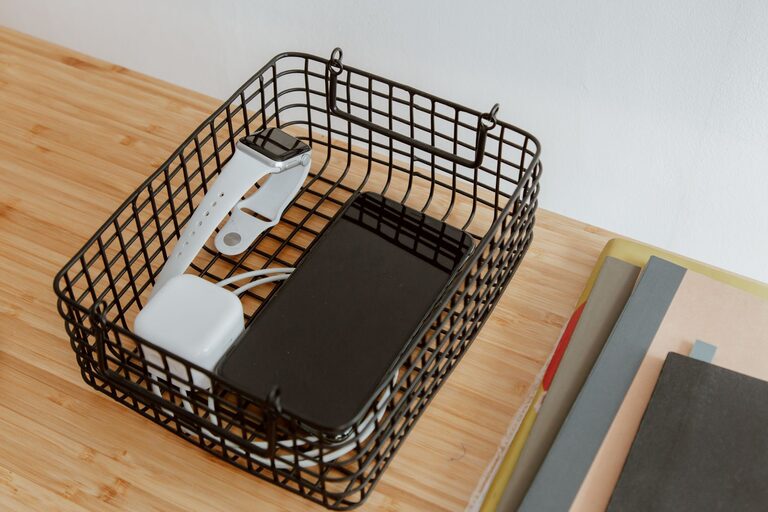
A dedicated charging station can make everyday life easier. Instead of searching for cables or finding devices scattered around the house, you can keep everything in one convenient location. A well-planned station also helps reduce cable clutter, protect devices, and make sure your most-used electronics are ready when you need them.
You do not need an expensive setup. With a suitable location, a reliable power source, and a few simple organizers, you can create a charging station that fits your home, office, or travel routine.
Choose the Right Location
Start by choosing a location that is easy to reach but does not interfere with daily activities. Common options include a desk, entryway table, kitchen counter, nightstand, or shelf.
Consider the following factors:
– Access to a wall outlet: Choose a location close to an outlet to avoid long extension cords.
– A stable surface: Devices should rest on a flat, secure surface while charging.
– Good airflow: Avoid enclosed boxes or crowded spaces that can trap heat.
– Distance from liquids: Keep the station away from sinks, coffee makers, and areas where spills are likely.
– Convenience: Place it where you naturally use or store your devices.
For a family charging station, a central location may work best. For a personal setup, a desk or bedside table may be more practical. If you are charging phones overnight, keep the station positioned so cables do not cross walkways or hang where they can be pulled.
Take Inventory of Your Devices
Before buying accessories, list the devices you expect to charge. This prevents you from purchasing equipment you do not need and helps you plan the station’s size.
Your list might include:
– Smartphones
– Tablets
– Wireless headphones
– Smartwatches
– E-readers
– Cameras
– Portable game systems
– Keyboards and mice
– Rechargeable batteries
– Portable power banks
Note which charging connectors each device uses. Many newer devices use USB-C, while some older electronics may use USB-A, Lightning, or specialized charging cables. Knowing your device mix will help you select chargers and cables that are compatible with everything you use.
Select a Reliable Power Setup
The power source is the foundation of your charging station. You can use a standard power strip with individual adapters, a multi-port USB charger, or a charging hub designed for several devices.
Power strips
A power strip is useful when your devices use different types of adapters. Look for a model from a reputable manufacturer with enough outlets for your needs. A strip with an on-off switch can make it easier to turn the station off when it is not in use.
Avoid connecting one power strip to another. This practice, sometimes called daisy chaining, can create unnecessary electrical risk and is not a good way to expand the number of outlets.
Multi-port chargers
A multi-port USB charger can reduce clutter by replacing several separate charging blocks. Choose one with enough ports and suitable power output for your devices. USB-C ports may support faster charging for compatible electronics, but charging speed also depends on the device and cable.
Do not assume that every port delivers the same amount of power. Read the product information and check whether the total output changes when multiple devices are connected.
Surge protection
A surge-protected power strip may help protect connected electronics from certain changes in electrical power. It is not a replacement for careful use or proper electrical installation, but it can be a useful feature for a home office or entertainment area.
Replace damaged power strips, adapters, or cables. Frayed insulation, bent connectors, loose plugs, or unusual heat are signs that an accessory should no longer be used.
Organize the Cables
Cable management is one of the most important parts of a charging station. Without it, even a small setup can quickly become tangled.
Try these simple solutions:
– Use short cables where possible.
– Label both ends of cables used by different people.
– Add small cable clips to keep cords in place.
– Use hook-and-loop straps to bundle extra length.
– Store less frequently used cables in a labeled container.
– Choose different colors for different devices or family members.
– Leave enough slack for comfortable use without creating loops across the floor.
A cable tray mounted beneath a desk can keep adapters and extra cord length out of sight. For a shelf or countertop, a cable box can hide a power strip while allowing cords to pass through openings. Make sure the box has enough ventilation and is designed for cable storage. Do not cover a warm power adapter with clothing, paper, or other materials.
Add a Charging Organizer
A charging organizer gives each device a designated place. It may be a simple tray, a desktop stand, a wall-mounted shelf, or a multi-device dock.
Choose an organizer based on how many devices you charge and how much space you have. Look for:
– Separate slots that prevent devices from leaning against one another
– Open sides for airflow
– Wide openings for cable connectors
– A stable base that will not slide easily
– Enough room for devices with protective cases
– Materials that are easy to clean
If several people share the station, assign each person a slot or basket. This makes it easier to identify missing devices and keeps personal cables from becoming mixed together.
Set Up the Station Step by Step
Once you have the location and equipment, assemble the station in a logical order:
- **Clear the surface.** Remove items that do not belong in the charging area.
- **Place the power source.** Position the power strip or charging hub where it is accessible but secure.
- **Route the main cable.** Keep the cable against a wall or along the back of furniture.
- **Add the organizer.** Leave enough space for devices to be placed and removed easily.
- **Connect the charging cables.** Use only the cables and adapters that match your devices.
- **Secure loose cords.** Use clips or straps to prevent cables from sliding behind furniture.
- **Test each port.** Connect devices one at a time and confirm that they charge normally.
- **Label the setup.** Mark shared cables or ports if several similar devices are present.
Take a photo of the finished arrangement if you frequently unplug the station. It can serve as a quick guide when you need to reconnect everything.
Follow Basic Charging Safety Habits
Good charging habits help keep the station dependable. Use chargers and cables that are compatible with the device and come from trustworthy sources. Avoid using visibly damaged accessories, and do not place devices under pillows, blankets, or other materials while charging.
Keep the area dry and avoid overloading the power source. If an adapter or device becomes unusually hot, smells unusual, makes a buzzing sound, or shows other unexpected behavior, disconnect it and inspect the setup. Follow the manufacturer’s instructions for the device and charger.
A charging station should also be easy to switch off or unplug when you are away for an extended period. Keep the power switch accessible instead of hiding it behind furniture.
Maintain the Station
A few minutes of maintenance each month can keep the station organized. Remove unused cables, wipe dust from the surface, and check adapters for damage. Review whether your current setup still matches your devices. When you replace a phone or add a tablet, you may need a new cable or a different charging hub.
It is also helpful to keep one spare compatible cable in a separate location, such as a travel bag. Avoid storing every cable at the station, since too many extras can make it difficult to find the ones you use regularly.
Final Thoughts
The best charging station is simple, accessible, and suited to your routine. Start with a safe location, choose compatible power accessories, organize cables, and give each device a clear place. With a small amount of planning, you can create a tidy charging area that saves time and keeps your everyday electronics ready to use.